-
The Web seems to be a technology with the potential for avoiding the aforementioned constraints. Two features of the Web afford us what we needed for this project: component architecture and connectivity. The concept of component architecture is quite simple. It refers to a new approach to developing software. This approach provides a set of standards and framework that allow multiple software systems to interact with each other, sharing data and utilizing each other’s unique functions. Apple’s OpenDoc and Miscrosoft’s OLE are two systems that exemplify the concept. The Web is another example of the component architecture. A typical Web page can contain text, graphics, animation, speech, and video. These different components can be produced with different software applications: a word processor or text editor for the text, a drawing program or graphic program for the graphics and animations, and an audio/video program to produce the audio/video files. They are then assembled on the fly to be presented in a single application?a Web browser.
There are two worthwhile points to make. First, to produce the different components in this architecture is much less difficult and expensive compared to the traditional way. As developers, we do not need to write a single large and very complex system to handle text, graphics, audio/video, and speech-text conversion since many special programs for those purposes already exist. We only need to find a way to make the programs work together. And the Web provides such architecture. For instance, in order to provide students the opportunity to access language in different modes, we need a system that at the command of the student "speaks" student written texts. To develop such a system would be quite difficult technologically and financially. Thanks to the Web, however, we are able to link Apple Computers’ text-to-speech technology, Netscape’s Web browser, JavaScript, and MVP Solutions’ Talker plugin to enable that function. In fact, the whole system we developed completely relies on component architecture. We further discuss this system in the next section.
Second, component architecture enables the presentation of content in an integrated fashion. This is very important for our project. Engaging students in a variety of activities, including reading, writing, researching, communicating, and drawing, is a significant aspect of the existing literacy program. At this time, more than one piece of software is needed to support all these activities. Given the intended users of our project the problems with separate software applications are even more salient. Besides the problem of screen and data sharing, separate software also introduces the problem of students and teachers learning to use the various software systems. Using the Web reduces the number of things to learn thus increases the possibility of students and teachers spending more time using the system (Zhao, 1998).
Connectivity is another feature that makes the Web a better candidate as the technology for the project. Connectivity not only provides the capacity for communication among peers and between students and experts as they access information beyond the classroom walls, but also enables seamless data sharing across activities. The communication capacity of the Web is quite obvious, so we will only elaborate on its potential for sharing data across activities. Kaput and Roschelle (1996) suggest that one of the biggest problems with traditional educational software lies in the difficulty in exchanging data easily across the different systems. Students’ data and finished work using one piece of software can not be associated with another activity using a different piece of software. For example, if we had taken the traditional approach, our students would be reading the Living Books on CD-ROM, writing with ClarisWorks, communicating with Eudora, making stories with StorySpace, each system has its own way of storing data. It would be very difficult for the students or teachers to move back and forth among them. In the new system, all activities take place in one place - the Web browser - and all data are stored on a Web server, making it possible for students to link reading activity to writing, writing to drawing, and drawing to research activity or vice versa.
The Web, however, also places a number of constraints on our design. First, it is a new technology. Many of its functions are still unstable and not as sophisticated as their stand-alone counterparts. For example, word processing is still quite rudimentary compared to many word processing program (Microsoft Word, ClarisWorks, or WordPerfect). Drawing using Java Applet is less impressive than most stand-alone drawing programs. Second, the Web requires a network, which may not be available to all schools. Third, the performance of the Web is determined by many factors, the server, the network, the local machine, the browser, to name a few. Therefore it is much more susceptible to performance problems than stand alone applications. For instance, when the server crashes, students cannot access the program at all and it would be more difficult to fix. Users can simply reboot the machine when a stand-alone program crashes, but they may not be able to do so with a server because it is located in a distant place.
ELP Meets the Web: Shaping and Shaped by the Technology
The Web is a technology that is open to multiple interpretations. In this project, the practices and principles of ELP shaped our interpretations of the Web, defining the Web as a literacy development environment. At the same time, the affordances and constraints of the Web also influenced the realization of the curriculum, resulting in a Web-based literacy development environment that is not exactly the same as the original ELP curriculum, not even the one envisioned to be extended by CD-ROM technologies.
The literacy activities and principles of the Early Literacy Project served as a basis for designing web-based environments that incorporated the specific features of the prior project and that have been found to be effective in general education. Essentially, the technology application was designed to function as an intellectual partner for the learner, serving to stretch cognition between the learner and the machine, helping to off-load cognitive activity in the face of complexity, and providing strategies and representations to aid writing and reading processes. In the next paragraphs, we review the particular features of Tele-Web.
Tele-Web: An Overview
TELE-Web consists of a set of server side software
and client side plugins that work with a Web server and database applications
to offer a suite of multi-functional 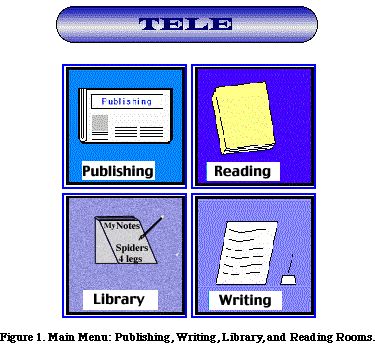 tools
in an integrated fashion for teachers and students to use within a Web
browser. It enables teachers to adopt, develop, manage and share multimedia
literacy materials, as well as to initiate, conduct, and manage collaborative
learning projects. In addition, teachers and researchers can archive students'
reading and writing responses in order to observe, monitor and report
students' literacy performance. Within this environment, learners are
enabled and encouraged to explore, experiment, and experience independently
and collaboratively with their peers from the same school or from a school
afar. Tools are also provided to help students develop performative abilities
in reading and writing, in addition to the metacognitive skills related
to becoming goal-oriented, self-regulatory, independent learners.
tools
in an integrated fashion for teachers and students to use within a Web
browser. It enables teachers to adopt, develop, manage and share multimedia
literacy materials, as well as to initiate, conduct, and manage collaborative
learning projects. In addition, teachers and researchers can archive students'
reading and writing responses in order to observe, monitor and report
students' literacy performance. Within this environment, learners are
enabled and encouraged to explore, experiment, and experience independently
and collaboratively with their peers from the same school or from a school
afar. Tools are also provided to help students develop performative abilities
in reading and writing, in addition to the metacognitive skills related
to becoming goal-oriented, self-regulatory, independent learners.
The Tele-Web environments are shown in Figure 1. There are four central environments that form the core of TELE-Web: the Writing Room, Reading Room, Library, and Publishing Room. Each of these environments has a teacher and student interface which allow teachers and students to create assignments; students to create, revise and complete assignments; teachers and students to add on or to comment on other students' work; and the students to read other students' stories. What is unique in these various environments is the opportunity for students to receive cognitive and social support in each environment, insofar as the cognition and cultural capital and artifacts are distributed across the whole network in TELE-Web (Salomon, 1993).
Student Interface
The Writing Room. In the Writing Room,
students can compose several types of text genres, including narrative
(My Story), personal experience (Morning News), and descriptive/narrative
(about a Picture). They can also choose to Continue a Story written by
another student. Each time students write a story, they are given the
authority to choose who can read their story (e.g., by identifying specific
names of student, the entire classroom, other classrooms, or other audience
members on the Internet). They can also consent or deny permission for
other authors to add to continue their story, but when their story is
published in the database, their story is available for comments or questions
(see Figure 2). 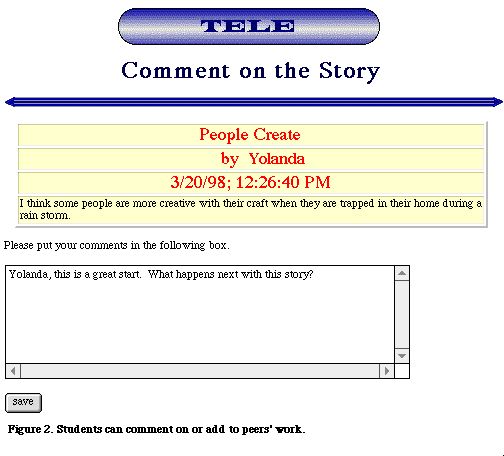 In
this fashion, students are given power and authority in deciding the audience
of their texts, and determining what actions their audience can take with
their text.
In
this fashion, students are given power and authority in deciding the audience
of their texts, and determining what actions their audience can take with
their text.
There are three features of the Writing Room that makes it uniquely suited for literacy development. The dual potential for collaboration and responding to texts in reciprocal ways is expected to enhance the potential for building ever-widening reciprocal learning communities and funds of knowledge for writers. Children could build upon or enter text to add to each other’s stories in a reciprocal way, or provide feedback or information to an author as they present their own intellectual capital and a fund of knowledge for others to access. The opportunity to learn and be informed by the multiple perspectives and cultural expertise of others is an important facet of the program, especially for students with disabilities. The publication of stories on the Internet has the potential to provide authors many virtual writing and cognitive partners, as audience members from distant geographical locations use the comment function on TELE-Web to ask questions, redirect thought, provide new interpretations, activate the retrieval of knowledge, provide scaffolding, or engage in sense-making. Essentially, the web-based software opens up new opportunities for apprenticeships, where students can be supported by others while learning how to actively use their knowledge to compose and monitor their texts. Simultaneously, children with disabilities are positioned as authors, experts, and critical thinkers within and outside their classroom walls.
Second, the writing room, like all the rooms in TELE-Web, supports the development of reading and writing skills through an emphasis on the integration of language modalities (e.g., speaking, reading, writing, listening). Although we had originally envisioned using CD-ROM talking books to support beginning readers, the opportunities to have simultaneous access to oral (aural) and written (visual) texts on TELE-Web makes it an ideal environment for beginning readers and writers. With the click of a button, the computers can give immediate assistance and provide the reader or writer with help on words that are difficult, furthering students' development of word recognition skills, reading fluency, and the development of an awareness of sound-symbol correspondences (Jones, Torgesen, & Sexton, 1987; Roth & Beck, 1987). In writing, children with mild disabilities could use the text-to-speech function to identify and correct significantly more punctuation, spelling, grammatical, meaning, and syntactical errors (Espin & Sindelar, 1988; Raskind & Higgins, 1995; Rosegrant, 1986). The immediacy of speech feedback for words and discourse can mirror the real-time language processes of reading and writing, with the additional advantage of providing readers and writers with information about the oral, linguistic, grammatical, phonemic, and graphic features of the words in the oral/written discourse. In essence, the computer is "shaped" into an on-site reading tutor, providing immediate assistance upon demand.
Finally, the TELE-Web writing environment has a teacher interface that allows teachers to develop and deliver writing prompts to assist writers during the writing process. Students with learning difficulties are often lacking self-regulatory (metacognitive) mechanisms, which is extremely important in problem solving in complex ill-structured domains, such as writing. The TELE-Web environments provides teachers with the option of customizing particular assignments for a student or group of students by writing specific prompts that might cue strategies or regulatory processes. For example, teachers could generate computer-provided metacognitive questions to scaffold the performance of students as they compose a story narrative (e.g., Who is the main character? What is the setting? When does the story take place? What is the problem? What does the main character do to try to solve the problem? What happens?) or a personal experience story (e.g., Tell Who? When? Where? What happened? Give details).
Writers then can choose to see these prompts as they plan or edit their stories. In this way, teachers and children could offload the cognitive burden of cueing or remembering strategies onto the computer (Salomon, 1993). Technology is assigned the function of being the repository of cognition and thought by the teacher or students that could be later accessed by writers to mediate performance (Salomon, 1993). Practically, the computer technology becomes the writing partner for the student, providing supported situations and distributing the intellectual work of strategic performance to help children perform more complex processes than their current knowledge and skills alone might allow (Salomon, 1993).
The Library Room. The library room provides a different but coordinated set of functions that are also intended to scaffold the performance of children with disabilities. When children enter the library room, they have a choice of three environments: making reference notes, creating semantic webs or maps, and recording conceptual vocabulary. All of these are designed to support the development of learning-to-learn processes by providing access to representational systems to aid students in the archival and retrieval of ideas, as well as the organization of their knowledge into conceptual and scientific frameworks.
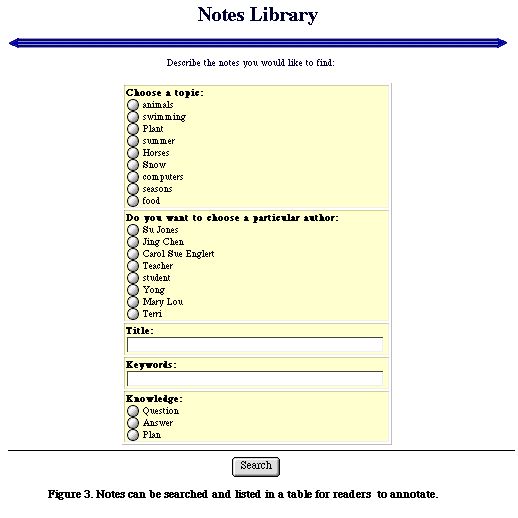 For
example, in selecting TELE-Web Notes (Figure 3), children could
produce notes and enter their notes in a database that could be accessed
by other children, as shown in Figure 4. As in any referential system,
they can assign their notes salient keywords by which their ideas can
be tagged and retrieved. Upon retrieval, the notes could then be added
to or edited by the author. Other students can access these notes or respond
to them with their own questions or to append information related to the
topic to contribute to the growing database. TELE-Web, therefore, can
provide a shared workspace where students can post ideas and use each
other as teachers, reviewers and critics. In this way, the knowledge of
a particular topic can be far greater than a single individual based upon
the collective funds of knowledge contributed by the various participants
in the group, and by the deeper questions of participants that provoke
deeper inquiry and investigations. Unlike many school situations where
students work in solitary contexts, TELE-Web enables a collaborative forum
that might bring together diverse partners from around the world in educational
inquiry.
For
example, in selecting TELE-Web Notes (Figure 3), children could
produce notes and enter their notes in a database that could be accessed
by other children, as shown in Figure 4. As in any referential system,
they can assign their notes salient keywords by which their ideas can
be tagged and retrieved. Upon retrieval, the notes could then be added
to or edited by the author. Other students can access these notes or respond
to them with their own questions or to append information related to the
topic to contribute to the growing database. TELE-Web, therefore, can
provide a shared workspace where students can post ideas and use each
other as teachers, reviewers and critics. In this way, the knowledge of
a particular topic can be far greater than a single individual based upon
the collective funds of knowledge contributed by the various participants
in the group, and by the deeper questions of participants that provoke
deeper inquiry and investigations. Unlike many school situations where
students work in solitary contexts, TELE-Web enables a collaborative forum
that might bring together diverse partners from around the world in educational
inquiry.
There is also a suite of tools to support the deeper representation of children's knowledge into conceptual models through the mapping functions of TELE-Web. There are six different types of maps, ranging from Venn diagrams, to semantic webs (One-Level Web, Multi-Level Web), to story maps, to explanation maps. Each map represents a conceptual procedure or representational structure of information (see Figure 4). Students can define information categories, input information items, and re-arrange the information items by dragging and dropping them into the desired category. In addition to the pre-defined structures, an open drawing and mapping tool is also available. Children could draw pictures of their ideas, which is ideally suited for nonwriters, as well as for learners who need to represent the results of scientific inquiry through drawings.
Importantly, the webs and maps become the means for teachers to "intellectualize" cognitive activity. The maps provide an anchor or linchpin for creating a collective knowledge that can guide intellectual activity and for the participation of students in a literate discourse about the structures of informational texts. In effect, cognitive functions regarding categorizing ideas could be off-loaded onto the webs until the time that students could perform the cognitive actions of organizing ideas into texts or composing organized texts without visible or symbolic representations of the process. Thus, the webs serve to scaffold mediated performance in the students' Zone of Proximal Development (Vygotsky, 1978), that is, the distance between students' independent performance and the level of performance achieved with the benefit of the webs and the social interactions with other members of the class.
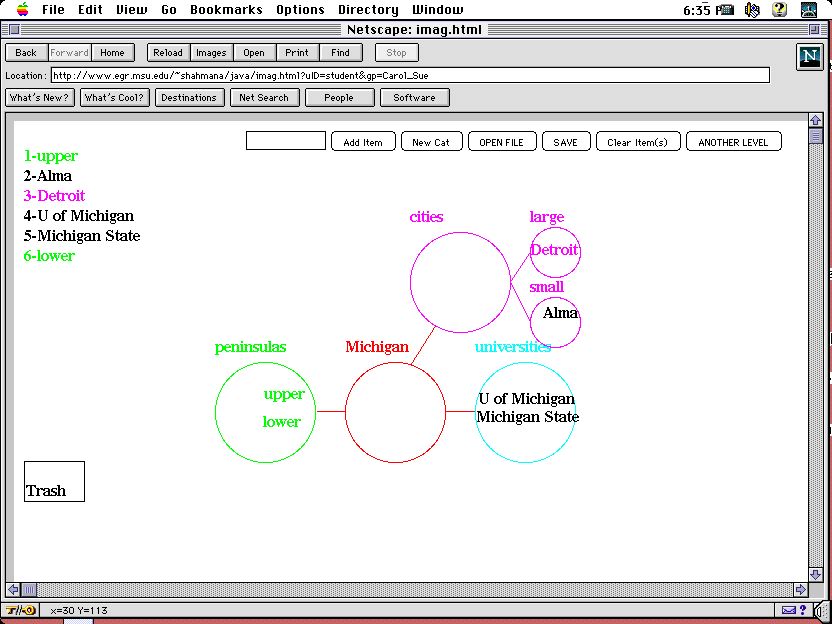 These
maps were created with Java applets that can be distributed across the
Internet. Students and teachers can create, edit, or discuss the maps
collaboratively across time and space. These maps can be used as a distributed
system that represents collective knowledge and encourages collective
knowledge construction. The maps can be used to not only support discourse
development but also trigger discourses. In other words, students from
different groups can use the mapping functions as cognitive tools to record,
organize, and represent their ideas and access them when needed. By sharing
or collaboratively creating maps, students can exchange ideas, clarify
confusions, and explore new possibilities. The communications about or
around the maps become important authentic writing and reading activities
for literacy learners that engage them in a more critical discourse about
ideas and meanings.
These
maps were created with Java applets that can be distributed across the
Internet. Students and teachers can create, edit, or discuss the maps
collaboratively across time and space. These maps can be used as a distributed
system that represents collective knowledge and encourages collective
knowledge construction. The maps can be used to not only support discourse
development but also trigger discourses. In other words, students from
different groups can use the mapping functions as cognitive tools to record,
organize, and represent their ideas and access them when needed. By sharing
or collaboratively creating maps, students can exchange ideas, clarify
confusions, and explore new possibilities. The communications about or
around the maps become important authentic writing and reading activities
for literacy learners that engage them in a more critical discourse about
ideas and meanings.
An additional form of scaffolding comes from the community. Gardner (1991) writes about the benefits of bringing the outside world into the classroom; "a myriad of educational opportunities exits in the wider community, including apprenticeships, mentorships, and other relations with competent professionals" (p. 104). Information network is an important feature of knowledge-building communities that has been incorporated into TELE-Web. This feature enables participants to create authentic linkages between knowledge-creating and knowledge-commenting communities. The current emphasis on authentic and situated learning has pushed the envelope on our conceptions of what constitutes an effective learning community in a classroom: in-depth problem-solving; working collaboratively with peers or partners in problem-solving inquiry; learning about topics or problems of personal interest; constructing and disseminating knowledge; serving as guides, mentors, and apprentices to others; and using information systems to access and contribute to the knowledge base (FARNET/CoSN, 1994). Nevertheless, to ensure that students maintain a central role in producing rather than digesting knowledge, contacts with outside sources need to be established and maintained, and a scientific discourse needs to emerge in the context of the obtained information. Restructuring schools requires attention to ways that they can increase their knowledge-building potential (Scardamalia & Bereiter, 1994).
Two mechanisms for advancing collective knowledge in the scientific community are the scientific journals and information systems that allow for peer review and comment (Scardamalia & Bereiter, 1994). Although knowledge-advancing and knowledge-commenting forums do not routinely exist in schools, TELE-Web allows students to create texts, graphical notes, and maps that are added to a collective database about topics of personal interest. The transformation of traditional patterns of solitary thought into a more collaborative, scientific discourse is further enhanced by the following features (see Scardamalia & Bereiter, 1994): (a) recognition of students for their personal expertise and contributions as authors of a database, (b) simultaneous access to other students’ maps and entries, (c) provisions for students to search, question or comment on an author’s notes, map, or graphic, (d) notification of authors when comments are made by other students, and (e) the construction and eventual publication of entries that could become part of a larger and more diverse scientific community that might bring like-minded investigators together though the internet (Scardamalia, 1994). Through these features, TELE-Web makes it possible for metacognitive activities to be overt and subject to public discussion and consideration, and creates authentic networks in which students create and exchange knowledge.
It is important to mention that the different rooms in TELE-Web are inter-connected and mutually accessible. All tools in the Library Room are readily accessible from the Writing Room or the Reading Room. In fact students were encouraged to consider the Library Room as a reference place where they could store and share rough ideas, action plans, or other kinds of intermediate products with their colleagues. For example, when a student is in the Reading Room reading a story, she can open the communal notebook and file some notes. Or when a teacher starts a thematic unit on animals, she can use the mapping functions to work on the main concepts with her students. Later, when the students start to write, they can refer to the notes and maps.
The Reading Room. TELE-Web also contains a reading room where students can engage in a host of reading activities. Realizing that there is more than one effective strategy for reading success, we have included over 15 different types of reading activities that have been suggested effective in ELP and other literacy research. These activities are placed in three sites: Comprehension, WordShop, and Book Chat. The comprehension site provides reading activities that target meaning at the text level. For example, there is a Cloze activity that allows the student to work on a text by filling out the words deleted by the computer. The student decides the interval of deletion and the starting point of deletion. Therefore, she can make it easy or hard. Cloze procedure has been suggested to be a very effective strategy in language development (Oller & Jonz, 1994). Other comprehension activities include Paraphrase the Story, Paragraph Scrambler, Reading Comprehension Story Map, and Continue the Story.
Activities in the WordShop focus on developing skills at the word level. Typical activities include Create a Word, Letter Scrambler, Crosstik, and Spelling. All activities in the WordShop, as in other places within TELE-Web, are highly individualized. For instance, Spelling utilizes speech-to-text technology to provide highly individualized exercise for students. A teacher can enter a list of spelling words and sentences for a student or group of students, who will then complete these on the Web. To complete this exercise, the students would click on a button to listen to the spoken form of the word and then write it down in the text field on the Web. The student then sends his answers back to the server for feedback. The system also keeps track of the performance of each student so that teachers can be informed of what words are problematic to which students.
Book Chat is a Web-based chat system that enables students to have synchronous communications with people at a distance or just in the same classroom in writing. Students discuss books they have read in Book Chat.
There are four unique features to the Reading Room of TELE-Web. First, the materials to be used in the reading activities are not limited. Unlike most traditional reading software, TELE-Web allows teachers, even students, to input their own reading materials. TELE-Web has one central online database of reading materials. All users of TELE-Web can contribute materials to the database. Materials are labeled in terms of grade level, genre, and possible reading activities. Contributors are also encouraged to rate the material. Contributors have control over who can use their materials. This means that the materials to be used in TELE —Web can be individualized and updated more frequently than traditional reading software. The second feature is that all reading materials in TELE-Web can be used across activities. In other words, a passage can be used for Reading Comprehension, Cloze, Paragraph Scrambler, and Continue the Story. Thus students can work with the same text in different ways. The third feature is that reading activities are closely linked to other activities. For example, while a student is reading, he can access the Tele-Web Notes, writing down his thoughts in them and access them later or share with other students. He can also access the mapping tools to draw concept maps of what he is reading. The fourth feature is that students can create reading activities for each other using the materials in the database on the server. For instance, a student, just like a teacher, can develop a reading comprehension exercise for his peers within the same class or another class that is also using TELE-Web.
The Publishing Room. As its name suggests, the Publishing Room provides a set of tools for students to publish, to make their work selectively available to the large community. There are a number of templates and a suite of tools for students to develop a portfolio of their work within TELE-Web and publish them on the Internet. Because TELE-Web is a closed environment in that only people with the proper authorization can enter the environment to access students work and communicate with them. This feature is a double-edged sword. On the one hand, a closed environment provides a sense of community and protects our young students. On the other hand, it prevents other people on the Internet to visit our students’ work. To compensate for this shortcoming (Levinson, 1997), we developed this publishing component.
In the publishing room, students can enter pictures, tell stories about themselves, and assemble works they have done in other rooms. Anyone on the Internet can visit the published works of students but they do not have access to the students’ real names or email addresses.
Teacher Interface
Tele-Web features a teacher interface that allows teachers to create and customize assignments for individual students. The teacher interface of TELE-Web provides a series of tools for teachers to create literacy activities that will appear in the student interface. We use the Writing Room as an example.
Writing Room. TELE-Web enables teachers to make highly individualized writing assignments for students. Upon entering the writing room, teachers are greeted with four choices: My Story, Morning News, and about a Picture, or Continue A Story, each representing one type of writing assignment they can create for students. By choosing one of the links, teachers are presented with a list of existing assignments, if any, and the choice to create a new assignment. With existing assignments, teachers can choose to read completed assignment, which allows the teacher read and provide feedback to students’ completed assignment. Teachers can also choose to edit an existing assignment, which allows them to change due dates, assignment title, and for whom the assignment is developed. When teachers choose to create a new assignment, they are first asked to provide a title for the assignment, then select a date when the assignment will be automatically made accessible to the students, and select the students who should complete this assignment. Only students who are selected to have access to this assignment will see this assignment when they log in. Teachers then provide the content of the assignment (e.g., prompts and instructions). Teachers can include other Internet sources as part of the exercise by providing a simple link.
In the other rooms, teachers have similar tools for developing, editing, and managing a variety of literacy activities. Additionally, teachers are also provided with tools to collaborate with other teachers by sharing reading materials, exercises, or concept maps. They can also initiate collaborative projects across classrooms among students.