In this module, you will make the first official page in your portfolio. This means making a decision on what authoring platform to use or deciding where and how to include your capstone work in an existing site (if you are planning on using one you’ve already created).
There is also a new topic this week, as we introduce the concept of Pieces of Flair both in the video and in the text below. In short, you will create three pieces of flair (as three additional webpages to your site) that are custom made specifically for you and your website in order to make it uniquely yours.
WHAT TO DO
Make sure you do each of the following activities to successfully complete this module.
🔍 Before you make your homepage
Before you do this assignment to make your homepage, please keep in the mind the following:
As you design your work, keep the following in mind:
- Consider your Audience – While the intended audience for your portfolio might change over the course of the semester, we think it is very important to start by taking a few minutes to consider what purpose you would like your portfolio to serve and what that means about who will be looking at it. Will it be primarily for other teachers? For parents, students, or your principal? Will it be something you continue to develop for an eventual job search? Considering your audience will help you better design your portfolio to effectively communicate whatever message you are hoping to send.
- Consider Feedback – Make sure you consider any feedback you received about your designs and efforts from last week. Thinking about the advice you received there may be helpful before proceeding with this assignment.
- A Work in Progress – You do not have to finalize your homepage now, as the goal in this course is always to get something working first and to continue to refine it based on feedback.
- Need Inspiration? – Consider examples from the homepages you saw when you reviewed portfolios from last semester. Pull up some of those examples for inspiration!
- What to aim for – This week, and for the rest of the semester, we will start using the “Design” criteria within your feedback notebook. Make sure you check those out before making your first page.
- What goes on your homepage? – It’s up to you what you think users should see when landing on your site. Maybe it’s a picture, a blog, a biography, or a summary of what’s (going to be) on your website.
✍️ Make your homepage
This week you will design your homepage on the platform you have chosen. Taking into account your experiences with web design last week, who your intended audience is, and any feedback you received, focus on making a page that is useful, organized, readable, and suited to your audience.
If you are using an existing portfolio for this class you may need to make some re-design tweaks to your homepage so that it is a more encompassing introduction to the pages that will soon be added. Since you are further along, please also ensure that you have added those forthcoming pages (e.g., the essays, resumé, annotated transcript, showcase, etc). They will (obviously) be empty, but we want to have a good idea about how you are planning to structure the portfolio requirements around what you already have.
✔️ Update your ShareTracker entry
Now that you have a homepage, your instructors and fellow classmates need to know where it is. Your assignment is to go to the ShareTracker, and update the link for your website.
Use these steps:
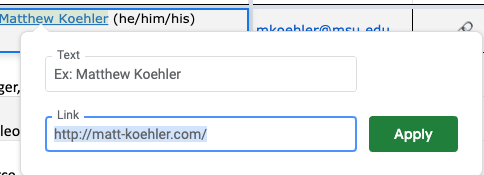
- Highlight your name
- Find and click the “insert link” button or use the short-cut (ctrl-K)
- Enter the address of your website
💬 Give and Receive Feedback
Starting this week, there are different different ways you can give and receive feedback. Read each of the choices below and make a choice that is best for you.
NOTE: The direct link to the module 3 discussion in Teams is here.
There are three different ways you can give and receive feedback in this module. We will explain each in detail below.
- You can arrange your own zoom meeting with another student. You both can work out the details on how to meet online, and give each other feedback. The coffeehouse is an option for you to use.
- You can use our CAPPY Chatbot (an experimental AI bot) to get feedback. This is only an option for modules 4-7 currently, but we are looking to expand if there is positive interest from students to do so.
- You can use Teams as we did earlier in the semester
Regardless of the format you chose, please remember, that order to give good feedback to read (and use) the guidelines for feedback.
📅 Schedule your own meeting
You can meet with a classmate in the Capstone Coffeehouse. However, you schedule a meeting with someone else and figure out the meeting details together. The Sharetracker has email contact information for everyone in the course, feel free to reach out…
You can show your work via sharing your screen, or ask someone else to look on their browser if you give them a link in the chat. It can take as little as 5 minutes to get some productive feedback on your page.
💬 Using Cappy
To use Cappy, please do the following:
- Visit CAPPY, the Capstone Chatbot
- Login or Signup (it’s free)
- Replace XXX with the address of your page to be reviewed, and enter the one the following prompts depending on the module you are submitting:
- My module 4 essay : XXX”
- My module 5 resume : XXX”
- My module 6 showcase : XXX”
- My module 7 learning goals : XXX”
- Review the feedback the CAPPY is giving you, and consider making the revisions it suggests
- Feel free to ask it any followup questions or suggestions you would like, based upon what it is telling you
If you use CAPPY, please leave us some feedback letting us know how it did.
🎥 Using Teams
When posting your reflection, go to the correct teams channel:
Initial Post
- Make a post and address the prompts (“Designers – Discuss”) in the pinned post on the channel.
- Provide context – Type in your name and description of the post (e.g., Matthew Koehler’s website draft) to accompany your video.
- Provide a link – Give a link to the webpage you want others to review.
Leave feedback for two others
Then leave responses with feedback for two others in the same channel as follows:
- Prioritize providing feedback to those who do not have any feedback
- Watch their post
- View their webpage (click on the URL that should be posted with their video).
- In making your response, make sure to follow the prompts in the pinned post labeled “Reviewers – Discuss”
- Provide context – Type in your name and description of the post (e.g., Matthew Koehler’s response to Megan) to accompany your video.
🔍 Learn about 'Pieces of Flair'
In order to complete your portfolio, you need to create three Pieces of Flair, or parts of your portfolio that are customized to you and your audience. The first piece is due by the end of Module 5. Your assignment this week is to read about Pieces of Flair here, understand the Pieces of Flair system, and start to think about pieces you might want for your portfolio.
✔️ Update Columns in the ShareTracker
At the end of each module, you will update the ShareTracker to submit your work for this module, and let us know about any revisions to previous work.
The Sharetracker is linked here, and available through the menubar at the top of this website.
Now is the time to “submit” your work by updating the ShareTracker. Specifically, do the following:
- Find your row in the ShareTracker, and find the Columns that correspond to this module
- Enter “done” for each part of the module you have completed
- Put “revised” and a date, for any assignments you have revised from previous modules
That’s it, you’re done with the ShareTracker for this Module.
🗒️ Feedback and Assessment
This week, and for the rest of the semester, we will start using the “Design” criteria within your feedback notebook. That is, we are paying attention to navigation, use of multimedia, good text design, and more. This is something we will revisit every week, and not something you can complete just by doing your homepage.
Further modules will have more focused feedback tailored to the assignment.
Optional: Deep Dives and Questions
☑️ Rubric for posting reflections and feedback
Whenever you give or receive feedback in this course, please pay attention to the following guidelines on what makes effective feedback and strong participation in the community
What makes for good feedback in a post, comment, video, or email?
It depends on the specific assignment, but the following generally apply:
- Focused – Pay attention to the prompts, and to the assignment that you’re discussing
- Thorough – Use a good portion of the video length allotted to you (for Teams users). Try to cover as many aspects of the assignment that you can—do not focus on only one thing. However, don’t try to cover too much, because each point you make should have some details (see next point).
- Specific – Avoid generalities like “you had a good design,” and instead be more specific, like “your headers are easy to read, clear, and helpful in breaking up text into more manageable pieces.”
- Critical – Point out what needs improving. Even if you’re looking at the best piece of work, you can give the author something to think about working towards or thinking about differently.
- Supportive – Point out what is working well. Even the earliest of drafts is the start of something good that can be highlighted as a success.
🎥 Detailed Teams instructions
💯 Policy for due dates, early work, and late work
Deadlines. Although we say “deadlines”, the course is designed to be flexible with pacing. Our “deadlines” are firm suggestions on how to stay on track in this course. Unless stated otherwise, the “deadline” for all work in a given module is due at 11:59 PM Michigan time on the last day of the module. The only true deadline in the course is that the final online portfolio is firmly due on the last day of class with no exceptions.
Early Work. The course dates we have laid out are minimum pacing requirements. Please feel free to complete the course faster than these required dates. The only minor hiccup may be around the final exhibition (Module 11), which is scheduled during a specific week. If we have enough people wanting to finish faster, we can likely have an early exhibition (or two).
Late Work. we have worked hard to design the course around modules and due dates that keep you on pace to complete a high-quality portfolio on time. We understand that life happens—getting sick, busy times at work, technology troubles, global pandemics, just to name a few—and things don’t go according to plan. If this happens, we expect you to communicate with your instructor before you miss a due date. In this communication, let your instructor know when you will have the work completed. If you aren’t sure, communicate the uncertainty and then communicate again when you do know. We are happy to work with you, but it is your responsibility to proactively communicate.
❓ What is the bonuses and bummers policy?
When you contribute Teams feedback at the end of a module, you are usually expected to provide feedback to two of your classmates.
Our Bonuses and Bummers policy describes exceptions to this expectation as follows:
- Bonus – If you’re the first person to submit your work for an assignment on Teams, you do not have to provide any feedback to anyone.
- Bonus – If you’re the second person to submit your work for an assignment on Teams, you only have to provide feedback to one person (the person who submitted first).
- Bummer – If you’re the last person to submit your work for a task or Piece of Flair, you probably won’t receive any Teams feedback from anyone.
🔍 The parts that make up a portfolio
The portfolio you make in this class has several components. The first component is the technology used to create and display your online portfolio (Weebly, Wix, WordPress, Google Sites, etc.). The process of deciding what technology to use is a scaffolded choice that happens throughout Module 1, Module 2, and Module 3, although you can revisit this decision at any time.
Once you have chosen a technology, this course helps you build 7 required pages that go in your portfolio, although there can be great flexibility and individuality in how these required pages are implemented in your portfolio. These seven pages are:
- A home page (Module 3) – You create a landing page, or the first page that viewers see when visiting your online portfolio.
- A resumé / vita (Module 5) – You create a page that highlights your professional preparation, appointments, skills, and goals.
- A showcase (Module 6) – You create a page that shows examples or artifacts of your best work from your master’s program.
- An annotated transcript (Module 8) – You create a page that lists the courses and topics covered as part of your master’s program.
-
Three reflective essays – You reflect upon your past, present, and future learning in the form of three essays:
- Goal Reflection (Module 4) – You reflect upon your learning goals you had prior to entering the program.
- Future Learning (Module 7) – You reflect upon goals you have for your learning after you leave the program.
- Synthesis (Module 9) – You reflect upon what you learned from your master’s program.
In addition to the seven required pages, you will add three or more components that are specifically tailored to you and your portfolio. We call these Pieces of Flair, and you mix and match these components in a way that adds breadth and depth to your portfolio. You might, for example, add a page that describes your classroom (that would be one Piece of Flair), or connect to your presence on LinkedIn (that would be another Piece of Flair).
One website technology, PLUS 7 required pages, PLUS 3 (or more) pieces of flair will give you a website that will be uniquely yours and that you can be proud of.
❓ When are office half hours?
Office half hours are optional times that instructors are available for you to meet online in our capstone coffeehouse to discuss your work, ask questions, or get additional feedback. They are completely and totally optional, although office half hours is one way you can meet the tech-check requirement.
Our office half hours are held in the capstone coffeehouse (under the “Communicate” menu).
Office half hours are:
- With Matthew Koehler
- By appointment — just send an email to arrange a time (mkoehler@msu.edu)
Exhibition preparation
Office half hours are opportunities to prepare for the end-of-semester exhibition in Module 11. This is particularly true from a technology perspective, since we want to help you iron out any bugs or problems well ahead of time. However, this is also true from a face-to-face perspective; one of the most common things we hear every semester is that people wish they had had more opportunities to meet with classmates and instructors face to face. Although we don’t have any “mid-semester exhibitions,” office half hours are meant to provide this kind of opportunity throughout the semester!
By appointment
If any of these times don’t work for you, and you need help or need to meet the Tech Check requirement by the end of Module 10, contact us to schedule an alternative time for you that works.
Please also keep in mind that you can use the Coffeehouse to meet with your classmates! If you’d like to get some face-to-face feedback from someone in your house, just set up a time to meet together and use the Coffeehouse to do it!
Where are office half hours?
Access office half hours by clicking the ☕ button on the menubar on the top of this page, or by reading our full overview of and instructions for the Coffeehouse.
❓ Why make a homepage?
Your homepage is the first page that visitors see when arriving to your site. It provides a first impression and shows readers what is available on your site. Developing a homepage is an important step in creating your portfolio—you should continue to revisit it and update its design as your portfolio changes.
Creating a well-developed home page is particularly important for the purposes of this course because your instructors and your peers will likely use your homepage to guide them as they give you feedback on your portfolio. The more effective your homepage is, the easier it will be for everyone to give you useful feedback.
Your homepage will also serve you well even after you’re done with this course. Your family, friends, and potential employers will likely use your homepage to guide them in exploring your website. It is also a great chance to sum up who you are and what you’re doing; you can thereby tailor the first impression they get of you. This is true for both those you know and those who want to get to know you a little bit better (and maybe offer you a job!).